How to trim a song online to the hundredth of a second
Trimming a song online is easy. Hitting the exact moment is harder, and it decides whether your ringtone starts on the chorus or on the tail of a verse. The Magic Master audio cutter has a waveform, a cursor, zoom down to two seconds, and time fields with steps of a hundredth of a second. WAV is cut in your browser, with no sign-up and no limit.
What the editor can do
- Cursor and playback. A click on the waveform sets the cursor. During playback the cursor moves along the track and shows where you are. There are buttons for "Play", "Play selection" and "Loop".
- Zoom. The "+" and "−" buttons, a "Whole track" button, and the mouse wheel with Ctrl (Cmd on a Mac). The view zooms in to two seconds, so you can place an edge exactly.
- Track overview. A strip of the whole track sits under the waveform. A click or a drag on it moves the view window.
- Edge handles. The edges of the selection drag with a mouse or a finger. The grab zone is generous, so the handle is easy to hit.
- The whole selection. You can drag the selected part without changing its length.
- Exact values. The "Start, s" and "End, s" fields take hundredths of a second. The "±0.1" buttons move an edge by a tenth.
- Keyboard. The ← and → arrows move the selected edge by 0.1 s, and with Shift by one second. Space starts playback.
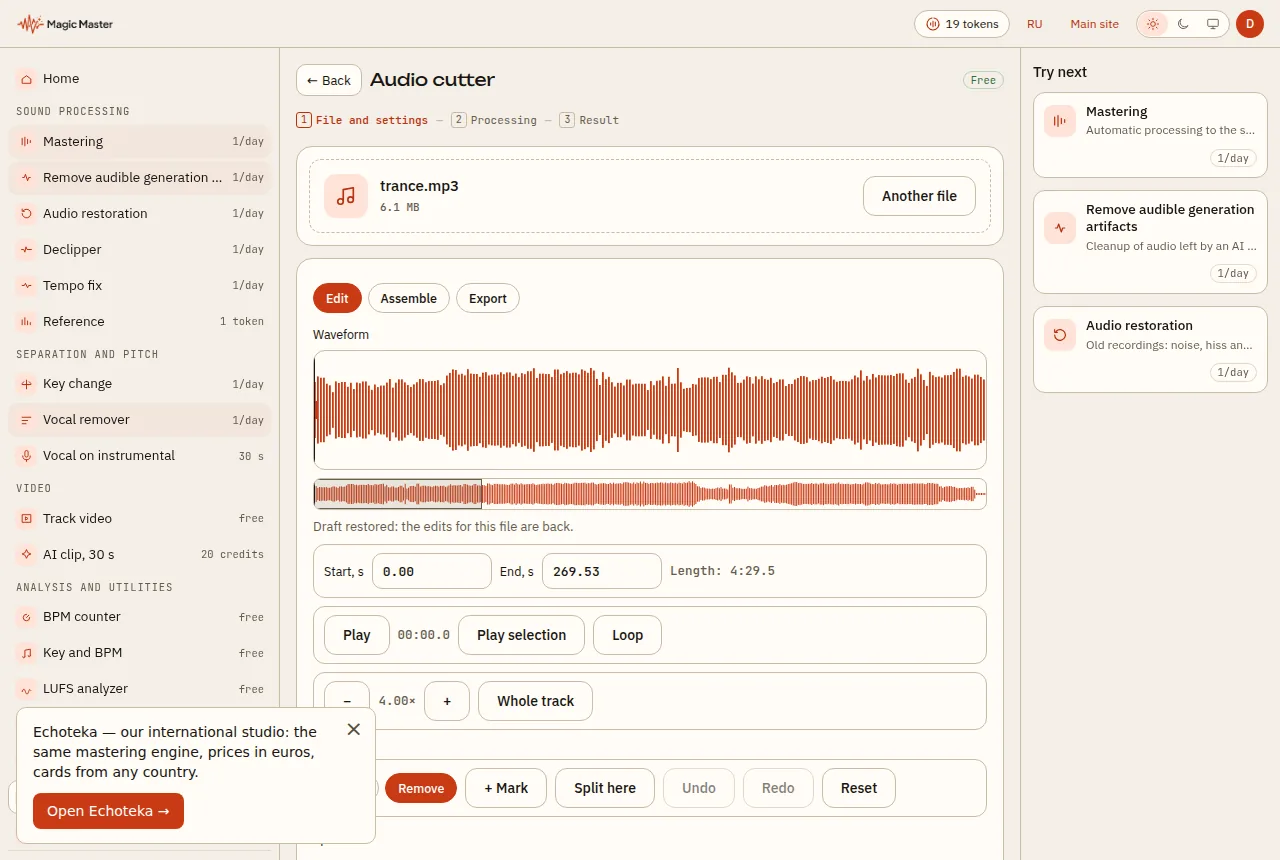
How to trim: eight steps
- Open the audio cutter and drop the file in the window or choose it with the button. WAV, MP3, FLAC, M4A and OGG are accepted, up to 300 MB.
- Wait until the file is read. A long track takes longer: on a computer the editor takes up to 40 minutes, and on a phone or a device with 4 GB of memory or less, up to 20 minutes.
- Drag the start and end handles. For precision, zoom in with "+" or with the wheel and Ctrl.
- Listen to the result: "Play selection" or "Loop" repeats the chosen part until you find the right point.
- Refine the edges in the time fields. If you need a 0.1 s step, use the arrow keys.
- To cut a piece out of the middle of a song, place the cursor, press "+ Mark" and choose the "Remove" type. The mark appears as a two-second region. Its edges can be dragged, and Shift with a drag on the waveform creates a new region.
- In the "Assemble" tab, put the parts in order, set the joins and the gaps between them, and add a fade in or a fade out of one second.
- In the "Export" tab, choose WAV 16-bit or WAV 24-bit, MP3 at 320 kbps, or a ZIP with separate parts. Press "Save".
Making a ringtone or a story clip
A ringtone usually needs 20–30 seconds with a smooth ending. Put the cursor on the start of the chorus, drag the right edge to the length you want, and in the "Assemble" tab turn on the fade out at the end. Then save a WAV or an MP3 and move it to your phone. If the excerpt needs mastering for a platform, the app suggests the next step after you save: mastering.
Precision: where the hundredth comes from
The value in each field is shown with two decimal places, so you can see which hundredth you are on. When you type a time or split a track, the edge snaps to the point where the signal is close to zero, within 5 milliseconds. That reduces clicks at the join. If you need more precision, zoom in to two seconds: then a single screen pixel covers only a small fraction of a second.
WAV, MP3 and limits
WAV is cut and saved in your browser with no limit. An MP3 is made on the server, so it needs a connection. MP3 shares a limit with the audio converter: one free file a day. After that you need a token, which requires signing in. If the limit is used up, choose WAV: it has no limit.
Drafts and undo
The editor remembers your edits. If you close the tab, the draft stays in your browser for 72 hours, but you choose the file again and the edits apply to it. Undo and redo work from the keyboard: Ctrl+Z undoes the last action, and Ctrl+Y or Ctrl+Shift+Z brings it back.
Removing a repeat from the middle of a song
Example: a song has an extra repeat of the chorus that you want to remove. Put the cursor at the start of the repeat, press "+ Mark", choose the "Remove" type and move the edges to the right beats. Zooming in first helps, because you can see the hit and the gap around it. Then, in the "Assemble" tab, join the remaining parts.
There are four join options: 0, 10 ms, 50 ms or 1 second. Choose the join by ear: try 10 and 50 milliseconds and keep the one where the transition is least noticeable.
Gaps and fades in the assembly
You can put a gap between parts: 0, 0.5 or 1 second. For the start and the end of the file there is a one-second fade in and fade out. They help when a piece ends too abruptly, and a smooth ending sounds more polished, especially for a ringtone.
Saving several pieces at once
The ZIP export saves each part as a separate file. That is handy for getting a chorus, a bridge and an outro in one go for different clips. The ZIP option works with WAV only, so if you need MP3, save the parts one by one.
About WAV quality
24-bit WAV keeps more detail than 16-bit, and it suits a piece that will go on to mastering. 16-bit WAV is fine for a ringtone or a quick share. You choose the format in the "Export" tab.
If the file does not open
The app says: "The audio could not be read. Try WAV or MP3." The usual reason is a damaged file or a format the browser cannot read. Save the file as WAV in any editor and upload it again.
What next
Cut your first piece. Open the audio cutter, load a song and place the cursor on the chorus. If the piece is for a video, build the clip in Track video next. To split a song into separate tracks first, read how to split a song into stems.
Questions and answers
Is trimming free?
Yes. WAV is saved for free and without a limit. MP3 is made on our server: one free file a day, then one token per file. The limit is shared with the audio converter.
Does the file go to a server?
Not for WAV: cutting, fade in and fade out are computed in your browser. An MP3 has to go to the server so that it can be encoded.
Which formats and what size?
WAV, MP3, FLAC, M4A and OGG up to 300 MB. A long track of up to 40 minutes works on a computer, and up to 20 minutes on a phone or on a device with 4 GB of memory or less.
How precise can the cut be?
The time fields take hundredths of a second. When you type a time or split a track, the edge snaps to the point where the signal is close to zero, within 5 milliseconds. That means fewer clicks.
Can I undo an edit?
Yes. Ctrl+Z undoes the last action, and Ctrl+Y or Ctrl+Shift+Z redoes it. Edits stay saved in the browser for 72 hours, but you need to choose the file again.
Upload a track — the same mastering engine, prices in euros.
Open Echoteka →AI mastering onlineLUFS analyzer